
How I Built Busy: A Deep Dive into a Project & Task Management Platform
How I designed and built Busy from the database up, why I made the architectural choices I did, the mistakes I corrected, and what I learned building a production-style task management system in about 16 hours.
Shivansh Kaushik
Full-Stack Software Engineer
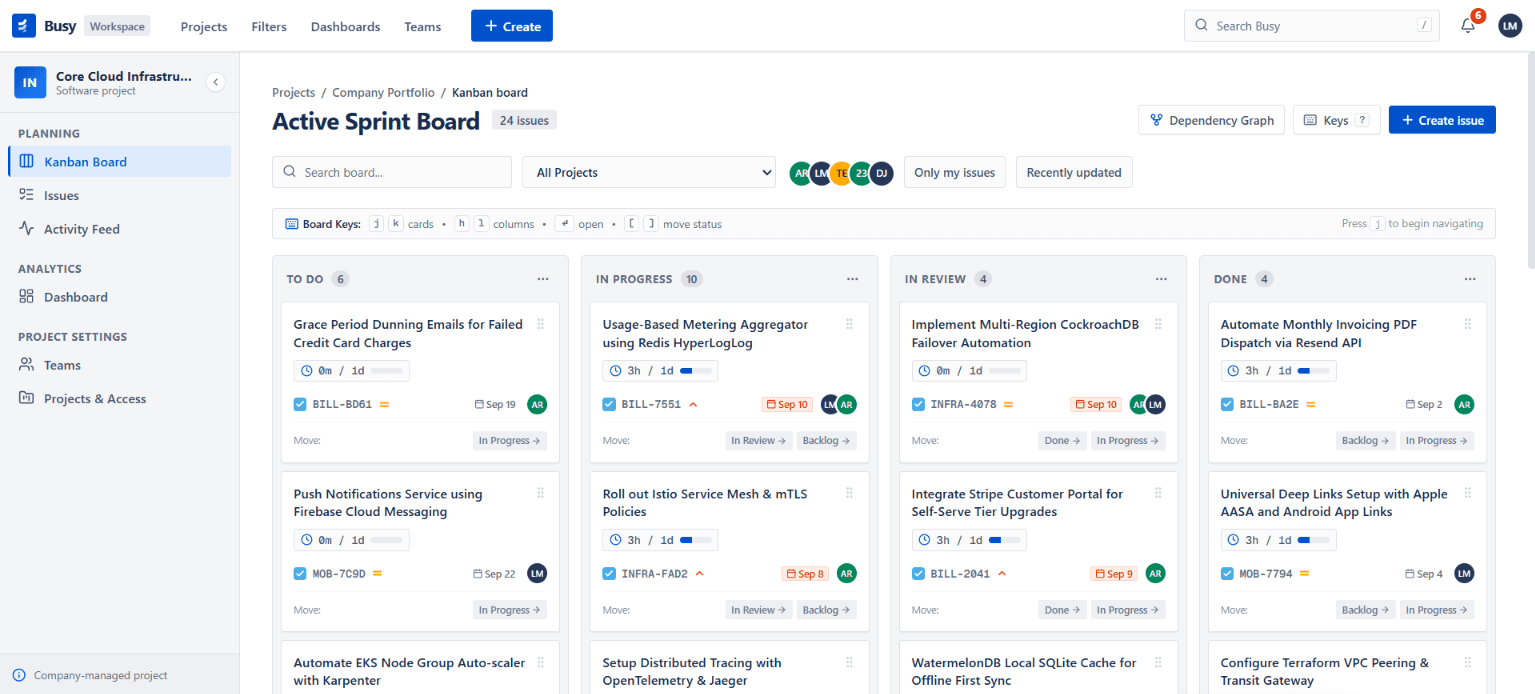
Table of Contents (56 Sections)
I have built a lot of web projects where the main challenge was getting the UI to look good and wiring a few APIs together.
Busy was different.
I wanted to build something that felt less like a college CRUD project and more like a small internal product that a real services company could actually use.
The idea was simple on the surface:
Build a project and task management platform where managers can create projects, assign people, track work, manage dependencies, monitor overdue tasks, and see what is happening across the organization.
But as soon as I started thinking about the rules behind that sentence, it got interesting.
What does it mean for a member to be allowed to see a project?
What happens if someone tries to mark a task as Done while another task is blocking it?
What happens if Task A depends on B, B depends on C, and someone tries to make C depend on A?
How do you make sure someone cannot bypass a UI restriction by calling the database directly?
How do you make an audit trail that cannot simply be edited after the fact?
And how do you build useful search and filtering without dumping thousands of rows into the browser?
Those questions became the real project.
This post is a detailed look at how I approached Busy, how I built it, the architecture behind it, the mistakes I made, and the engineering decisions I ended up being most proud of.
What exactly is Busy?#
Busy is a multi-project task management platform designed around the workflow of a services company.
The core problem I was trying to solve was fragmentation.
In a typical team, work can easily end up spread across:
- spreadsheets
- chat messages
- personal notes
- emails
- meetings
- someone's memory
That makes questions like these surprisingly difficult to answer:
- What is overdue right now?
- Who is overloaded?
- Which project is blocked?
- Why hasn't this task moved forward?
- Who changed a task?
- Which task is preventing another task from being completed?
- What happened to this task last week?
Busy brings that information into one place.
The application includes:
- manager/member roles
- project management
- task management
- multi-assignee tasks
- strict task lifecycle rules
- task dependencies and blockers
- server-side search/filter/sort/pagination
- bulk task actions
- CSV export
- portfolio dashboard
- immutable task history
- overdue alerts
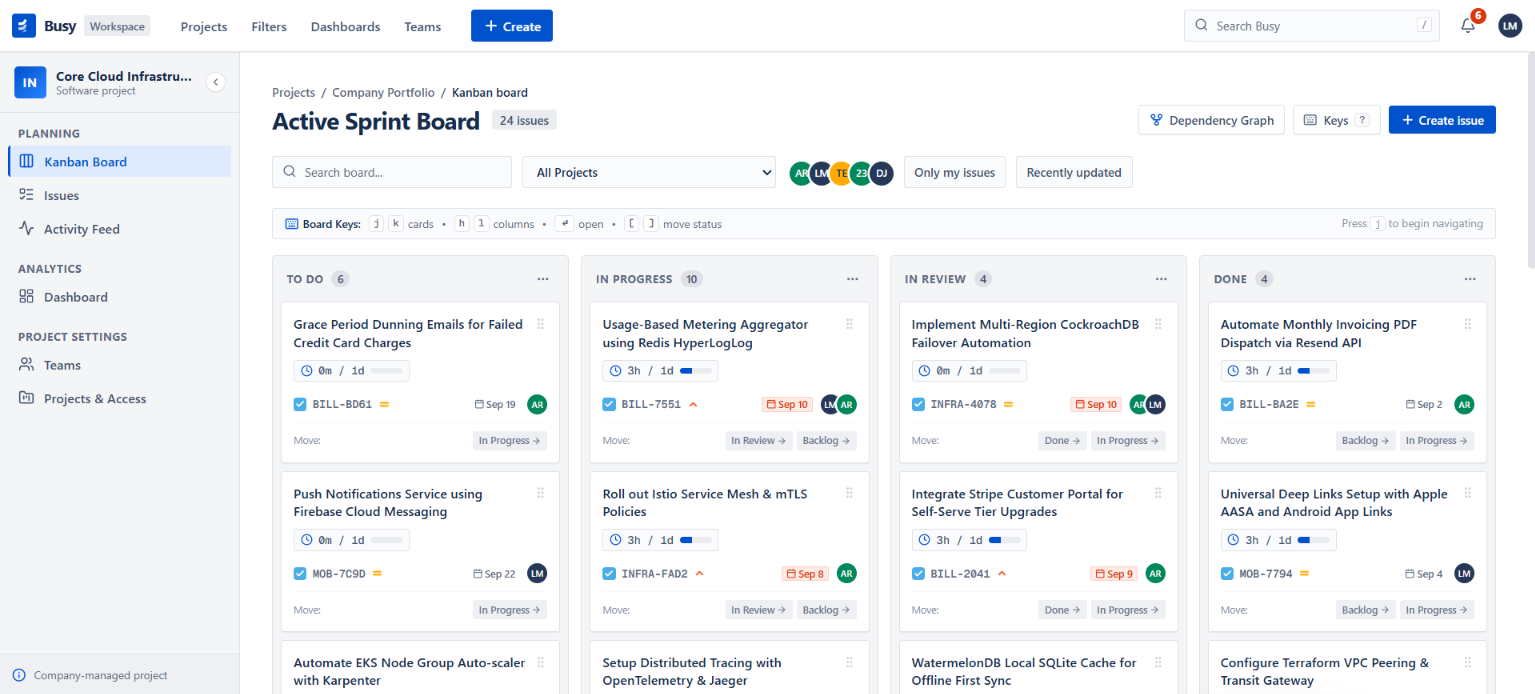
- drag-and-drop Kanban board
- dependency cycle detection
- time tracking
@mentions- activity feed
- overdue email digest generation
- keyboard shortcuts
The live application is available here:
Live: https://busy-one.vercel.app
Repository: https://github.com/ShivanshKaushik007/Busy
The first thing I changed about how I build projects#
One of the biggest differences between Busy and some of my earlier projects was where I started.
Normally, it is very tempting to start with the screen:
"Let's build the dashboard."
I intentionally did not do that.
I started with the data model and security model.
My reasoning was straightforward:
A task-management application is fundamentally a collection of rules operating on shared data.
So before building a fancy interface, I wanted to answer:
- What entities exist?
- How are they related?
- Which operations are allowed?
- Who is allowed to perform them?
- Which rules have to be enforced even if the UI is bypassed?
That led me to a foundation-first development strategy.
The development plan#
I structured the work into five focused sessions.
The initial target was a 12-hour engineering budget, but the actual build took roughly 16 hours including edge-case testing and documentation.
The sessions looked roughly like this:
| Session | Focus |
|---|---|
| Day 1 | Schema, authentication, database policies |
| Day 2 | Task lifecycle, blockers, dashboard, alerts |
| Day 3 | Server-side filtering, roles, assignments |
| Day 4 | UI overhaul, Kanban, teams, shortcuts |
| Day 5 | Cycle detection, time tracking, mentions, digest, activity feed, docs |
That sequencing mattered a lot.
I wanted every new layer to sit on top of a stable lower layer.
Step 1: Designing the database first#
The first meaningful commit in the repository was:
Project intialise and schema design
The database became the backbone of the entire application.
I used:
- Supabase
- PostgreSQL
- custom PostgreSQL ENUMs
- foreign keys
- cascading deletes
- Row Level Security
- database triggers
The schema contains eight main relational tables:
profiles
projects
project_members
tasks
task_assignments
task_dependencies
task_history
dismissed_alerts
The relationships are roughly:
                     ┌─────────────┐
                     │   profiles  │
                     └──────┬──────┘
                            │
                    ┌───────┴────────┐
                    │                │
                    ▼                ▼
            ┌──────────────┐   ┌──────────────┐
            │   projects   │   │ task_history │
            └──────┬───────┘   └──────┬───────┘
                   │                  │
          ┌────────┼────────┐         │
          │        │        │         │
          ▼        ▼        ▼         │
   project_members tasks  ...         │
                    │                  │
             ┌──────┴──────┐           │
             ▼             ▼           │
     task_assignments  dependencies ───┘
I also used PostgreSQL ENUMs for important domain values.
For example:
CREATE TYPE user_role AS ENUM ('manager', 'member');

CREATE TYPE task_status AS ENUM (
  'Backlog',
  'In Progress',
  'In Review',
  'Done'
);

CREATE TYPE task_priority AS ENUM (
  'Low',
  'Medium',
  'High',
  'Urgent'
);
That matters because a field like task status should not accept arbitrary strings from the database.
Instead of this:
status = "whatever"
I wanted the database itself to understand the valid state space.
User authentication and profile creation#
For authentication, I used Supabase Auth.
But I didn't want authentication data and application profile data to live in separate, manually synchronized worlds.
So I created a PostgreSQL trigger:
auth.users
    │
    │ AFTER INSERT
    ▼
handle_new_user()
    │
    ▼
public.profiles
When a user signs up, the trigger automatically creates the corresponding profile row and assigns the role.
That gave me one important invariant:
Every authenticated application user should have a corresponding application profile.
This also made role checks much easier later.
Step 2: Security was not a UI feature#
This was probably the most important architectural decision in the entire project.
I did not want authorization to look like this:
{isManager && <DeleteButton />}
and then assume the application was secure.
That only hides the button.
A user could still try to call the underlying action or database endpoint directly.
So I moved authorization deeper.
PostgreSQL Row Level Security#
Every major table has Row Level Security enabled.
The idea is:
Even if someone bypasses my UI, PostgreSQL should still enforce the data access rules.
For example:
- managers can access the entire portfolio
- members can only see projects they belong to
- members cannot delete tasks
- managers can manage project memberships
- task history can be inserted, but cannot be updated or deleted
- dismissed alerts are scoped to the user
I also created a helper function:
public.is_manager()
which checks the current authenticated user against the role stored in profiles.
This lets security-sensitive policies read more like domain rules instead of repeating the entire role lookup everywhere.
A surprisingly annoying RLS bug#
This was one of the first important debugging moments.
An early version of the project_members Row Level Security policy queried project_members from inside the project_members policy.
That created an RLS evaluation loop.
PostgreSQL eventually threw an error similar to:
active RLS recursion limit exceeded
This was a good reminder that database authorization logic is still code.
It needs to be designed carefully.
I changed the project_members policy so it did not recursively query itself, while keeping the important tenant isolation rules on projects and tasks.
This was one of the first places where my development process became:
build
→ test
→ hit a real edge case
→ understand why
→ redesign
→ test again
rather than simply:
write code
→ move on
Step 3: Building the task state machine#
Once the database and authentication were in place, I built the most important piece of domain logic:
the task lifecycle.
A task cannot just move from any status to any status.
The state machine is:
Backlog
   │
   ▼
In Progress
   │
   ▼
In Review
   │
   ▼
Done
I also support reopening completed tasks.
The valid transitions are centralized in a helper:
const validTransitions: Record<TaskStatus, TaskStatus[]> = {
  'Backlog': ['In Progress'],
  'In Progress': ['In Review', 'Backlog'],
  'In Review': ['Done', 'In Progress'],
  'Done': ['Backlog', 'In Progress']
}
That seems simple, but this helper became extremely important because I reused the same rules from different UI entry points.
A task can be moved through:
- task details
- the task list
- the Kanban board
- bulk actions
I did not want every UI to implement its own version of the lifecycle rules.
Instead, I made the server action the source of truth.
Why server actions became my backend layer#
Busy is built using the Next.js App Router and Next.js Server Actions.
Instead of creating:
/api/tasks
/api/tasks/:id
/api/tasks/:id/status
/api/projects
/api/members
...
I used server actions as the application-level RPC boundary.
For example:
updateTaskStatus(taskId, newStatus)
runs on the server.
The server action:
- creates an authenticated Supabase client
- identifies the current user
- loads the task
- validates the state transition
- checks blockers
- updates the task
- writes history
- revalidates affected routes
This made the application's domain rules much easier to reason about.
The "Done" button is actually a mini transaction pipeline#
Moving a task to Done is a good example of how much business logic can hide behind one UI interaction.
Suppose I have:
Task A → blocked by Task B
and Task B is still In Progress.
The user clicks:
Done
The server does not blindly execute:
UPDATE tasks
SET status = 'Done'
Instead, the request goes through a chain like this:
Browser
   │
   ▼
React Client Component
   │
   ▼
Next.js Server Action
   │
   ├── authenticate user
   │
   ├── fetch task
   │
   ├── validate state transition
   │
   ├── check blocked state
   │
   ├── query task_dependencies
   │
   ├── inspect blocker statuses
   │
   ├── reject if blocker unfinished
   │
   ├── update task
   │
   ├── insert audit history
   │
   └── revalidate affected pages
            │
            ▼
          UI
If Task B is not complete, the response is something like:
Cannot mark as Done:
Waiting on unfinished blocking task(s): "Task B".
That is the behavior I wanted.
Step 4: Task dependencies turned into a graph problem#
This is where the project became much more interesting.
Tasks can depend on other tasks.
For example:
Write API
   ↓
Connect frontend
   ↓
Run integration tests
   ↓
Deploy
This is a directed graph.
And it creates a dangerous problem.
What if someone creates:
A → B
B → C
C → A
Now the work is circular.
Nothing can ever be fully completed.
So I needed to prevent cycles.
Cycle detection with graph traversal#
I created:
src/lib/dependencyGraphUtils.ts
The dependency engine builds adjacency lists for both directions:
forward:
task → blockers

reverse:
blocker → tasks it blocks
Then, when someone tries to add a new dependency, I ask:
If I add this edge, is the target task already able to reach the source task?
If yes, the new edge closes a loop.
The algorithm is based on graph traversal.
For example, if I want to add:
A → D
I check whether D can already reach A.
If the graph currently contains:
D → C
C → B
B → A
then adding:
A → D
creates:
A → D → C → B → A
So the dependency is rejected.
Why I wanted to return the actual cycle path#
Simply returning:
Circular dependency detected.
is technically correct, but not very useful.
So the graph utility reconstructs the actual path.
Something like:
"Prepare API"
    →
"Connect frontend"
    →
"Run tests"
    →
"Prepare API"
That can then be surfaced directly in the UI.
This makes the algorithm useful not just for validation, but also for debugging.
I also reused the graph utilities for the project dependency audit feature.
That audit can answer questions such as:
- Is the project's dependency graph valid?
- What are the longest chains?
- Which tasks are directly blocked?
- Which tasks are indirectly blocked?
- What is the dependency depth?
So one small graph utility ended up supporting several product features.
Step 5: The biggest architectural mistake I made#
Ironically, one of the most important decisions in Busy came from something I did wrong first.
I initially built the task list using client-side filtering.
The first mental model was basically:
fetch everything
   ↓
React state
   ↓
.filter()
   ↓
.sort()
   ↓
paginate in browser
It was easy.
It also violated one of the project's requirements.
More importantly, it was a bad architecture for a system that may eventually contain many tasks.
Imagine 20,000 tasks being sent to the browser just so JavaScript can decide which 10 rows to display.
That is backwards.
Rebuilding search and filtering on the server#
I changed the task page to be a React Server Component that reads the URL's search parameters.
For example:
/tasks?q=design&status=In%20Progress&priority=High&page=2
The server then builds the database query from those parameters.
Conceptually:
let query = supabase
  .from('tasks')
  .select(..., { count: 'exact' })

if (params.q) {
  query = query.or(
    `title.ilike.%${params.q}%,description.ilike.%${params.q}%`
  )
}

if (params.status) {
  query = query.eq('status', params.status)
}

query = query.range(from, to)
This changed the system from:
database → all records → browser → filter
to:
browser request
      ↓
server query
      ↓
PostgreSQL
      ↓
only requested rows
      ↓
browser
That was a much better fit.
URL state turned out to be extremely useful#
The filter state is also synchronized with URLSearchParams.
That means this:
/tasks?project=PRJ-1&status=In%20Progress&priority=High&page=2
is a real representation of the current view.
Now filtered views become:
- refresh-safe
- shareable
- bookmarkable
- inspectable
- easier to debug
This was a small architectural change with a surprisingly large UX benefit.
I also added a small debounce to the search input so that typing does not trigger a URL update on every keystroke.
Step 6: Multi-assignee tasks and boundary rules#
I wanted tasks to support multiple assignees because real work often involves more than one person.
The data model reflects that with:
tasks
   │
   └── task_assignments
          │
          └── profiles
But assignment creates another important rule:
A user should only be assignable to a task if they belong to the task's project.
So I validate the project membership before inserting assignment rows.
This becomes especially important for bulk actions.
Step 7: Bulk actions without hiding failures#
Bulk actions are another place where it is easy to make the wrong abstraction.
Imagine selecting 20 tasks and asking to move all of them to Done.
What if:
- 12 are legally movable
- 5 are blocked
- 2 are still in
Backlog - 1 does not exist anymore?
I did not want:
one failure → entire batch fails
Instead, bulk actions return:
{
  taskId,
  success,
  error
}
for every item.
So the UI can report something like:
12 tasks updated
5 tasks blocked
2 tasks had invalid transitions
1 task not found
Internally, the status bulk operation reuses the same updateTaskStatus() logic.
That is important because it means there is still only one source of truth for lifecycle rules.
Step 8: Designing the immutable audit trail#
One of the requirements I cared about most was the task timeline.
I wanted a task to show:
- who created it
- who changed it
- what changed
- when it changed
- who was assigned
- who was removed
- comments
- worklogs
- estimate updates
The obvious database design would be multiple tables:
task_status_history
task_field_history
task_assignment_history
task_comments
task_worklogs
...
I instead chose one unified table:
task_history
with fields such as:
id
task_id
actor_id
action_type
old_value
new_value
created_at
That gives me one chronological stream.
For example:
created
updated_title
updated_priority
assignment
comment
status_change
worklog
estimate_updated
All in the same timeline.
The interesting security trick behind history#
The important part is not just having a history table.
It is preventing it from being rewritten.
The RLS configuration intentionally includes an insert policy but no normal update/delete policies for task history.
So the intended security model is:
INSERT ✅
SELECT ✅
UPDATE ❌
DELETE ❌
That means the UI doesn't have to "pretend" history is immutable.
The database is the one enforcing it.
That distinction matters.
A note about worklog deletion#
While reviewing the finished codebase deeply, I found an implementation detail I would change before calling the history system completely polished.
The time-tracking server action includes a deleteTaskWorklog() function that attempts to remove a worklog from task_history.
However, the database intentionally omits the general delete policy on task_history.
So the code and the declared immutability model are not perfectly aligned there.
That is exactly the kind of inconsistency I want to catch during a code review.
My preferred final design would be one of these:
- keep all worklogs truly append-only and add a compensating/reversal event, or
- move worklogs into a dedicated immutable log model if deletion semantics are genuinely required.
The important lesson for me was that security invariants need to be checked across the entire stack, not only at the function level.
Step 9: Overdue alerts without a background worker#
This feature was one of my favorite design problems.
The requirement was:
- show overdue tasks
- let users dismiss an alert
- if the task's due date changes later, the alert should come back
The first solution I considered would be a cron job or background worker.
That would work, but it felt unnecessarily heavy for this application.
I wanted the behavior to be derived from the data itself.
So I created:
dismissed_alerts
and stored:
user_id
task_id
dismissed_due_date
The key idea is the snapshot.
Suppose:
Task due date = 10 September
The user dismisses it.
The database stores:
dismissed_due_date = 10 September
Later, the manager changes the task to:
15 September
Now:
current due date != dismissed due date
So the notification naturally becomes active again.
No reset worker is necessary.
No special "revive alert" job is necessary.
The next server-rendered alert query simply sees that the snapshot no longer matches.
I really liked this pattern because the system's current state is derived from stored facts, instead of being maintained with another background process.
Step 10: Building the dashboard#
Once the core task data was reliable, I could start building analytics.
The dashboard shows metrics such as:
- open tasks
- overdue tasks
- tasks due this week
- tasks completed this week
It also breaks down work by status and assignee.
For the trend view, I used Recharts to display an eight-week completion trend.
The dashboard is intentionally more useful than decorative.
The questions behind the cards are:
What is open?
What is late?
What needs attention soon?
Who is doing what?
Are we completing work faster or slower?
That mindset affected how I designed the dashboard.
Step 11: The UI overhaul#
After the core logic was stable, I did a large UI pass.
I wanted the application to feel familiar to anyone who has used a serious work-management product.
So I went for a Jira/Atlassian-inspired visual language:
- structured navigation
- compact data grids
- status lozenges
- dense but readable layouts
- clear project context
- consistent priority visuals
- recognizable action patterns
The stack included:
- Tailwind CSS v4
- Base UI / shadcn-style primitives
- Lucide icons
- Framer Motion
I also introduced reusable visual primitives such as the Busy-style avatar and status lozenge.
The goal was not to clone Jira.
The goal was to build a UI language that feels appropriate for an internal operations tool.
Step 12: Drag-and-drop Kanban board#
Once the task lifecycle was stable, a Kanban board became a natural extension.
The board is essentially a visual representation of the same state machine:
Backlog | In Progress | In Review | Done
Dragging a card is not just a front-end operation.
When I drop a card into another column, the board invokes the same server-side task transition logic.
That means:
Drag & Drop UI
      ↓
updateTaskStatus()
      ↓
state validation
      ↓
blocker validation
      ↓
database update
If the move is illegal, the optimistic UI rolls back and the user sees the reason.
This is exactly why I built the state machine first.
The board became much easier once the domain logic already existed.
Step 13: Keyboard shortcuts#
I also wanted Busy to feel fast for people who use it frequently.
So I added a keyboard shortcut system.
The navigation shortcuts are:
g + d  → Dashboard
g + t  → Tasks
g + b  → Board
c      → Create Task
?      → Shortcut Cheatsheet
The most important part was not the shortcuts themselves.
It was avoiding accidental activation while typing.
For example, if someone is writing:
Create a new API contract
pressing c should not open the Create Task modal.
So the keyboard provider checks the event target and avoids triggering shortcuts while the user is interacting with:
- inputs
- textareas
- selects
- contenteditable elements
That is one of those small details that makes an interaction system feel much more polished.
Step 14: Teams and project membership#
Managers needed a way to control project membership, so I added a Teams view.
It is built around the relationship:
profiles
   ↕
project_members
   ↕
projects
Managers can add/remove people from projects.
And that leads to another rule:
Removing someone from a project should not leave stale task assignments behind.
So membership changes and assignment rules are treated as related domain operations.
The goal was to keep the relationship graph internally consistent.
Step 15: Time tracking#
Time tracking was one of the stretch features I added after the required system was stable.
I wanted users to be able to write:
2h 30m
45m
1d 4h
and have the system understand it.
I built a parser that converts human-readable durations into seconds.
For example:
2h 30m
becomes:
9000 seconds
Then the system can calculate:
time spent
remaining estimate
progress
I also added automatic remaining-time adjustment.
So if:
Remaining = 8h
Time spent = 2h
the default behavior becomes:
Remaining = 6h
The result is stored as a history event rather than mutating a separate worklog table.
Step 16: @Mentions#
For comments, I wanted a little more collaboration behavior.
When a user types:
@```

the comment input can suggest workspace members.

The selected person is rendered as a mention-style UI element.

This involved two pieces:

```text
MentionTextarea
CommentRenderer
The textarea handles autocomplete and insertion.
The renderer turns the mention into an interactive visual element.
Again, the interesting part was not just the feature.
It was integrating it without turning the comments system into a heavyweight rich-text editor.
Step 17: Activity feed#
At this point, I realized something useful.
I already had:
task_history
containing a stream of events.
So I could reuse that data to build an organization-wide activity feed.
The /activity page surfaces a chronological view of events across accessible projects.
That means one architectural decision — the unified history table — ended up supporting:
- task timelines
- worklogs
- activity feed
- change visibility
- auditability
This is a good example of why I like designing data models around domain concepts rather than individual screens.
Step 18: Overdue email digest#
I also built the logic for an overdue task email digest.
The digest engine:
- collects overdue tasks
- groups them by assignee/project
- formats them into HTML
- exposes the result through the digest flow
- provides an in-app preview
I deliberately kept the live external email transport separate from the digest generation logic.
That meant the application could demonstrate and test the entire content pipeline without making the core system depend on an external mail provider.
This also kept the deployment simple.
Why I did not add WebSockets everywhere#
One of the things I intentionally did not build was a fully realtime architecture.
It is tempting to add Supabase Realtime and subscribe every page to database changes.
But that creates another set of problems:
- long-lived browser connections
- connection lifecycle management
- reconciliation of simultaneous edits
- more complicated client state
- more operational behavior on serverless infrastructure
For this product, I preferred:
mutation
   ↓
server action
   ↓
database update
   ↓
revalidatePath()
   ↓
fresh server-rendered state
It is less flashy.
But it is deterministic.
For an internal project-management tool, deterministic consistency was more valuable to me than making every screen "live."
I would still consider selective realtime later, especially for the Kanban board.
Why I did not use Prisma#
I also intentionally skipped a heavy ORM.
The application uses:
@supabase/ssr
Supabase client
PostgREST
PostgreSQL RLS
rather than:
Next.js
   ↓
Prisma
   ↓
privileged database connection
The main reason was security architecture.
I wanted database queries to run under the authenticated user's scoped session, so PostgreSQL RLS remains part of the authorization boundary.
That also avoided introducing another ORM schema to keep synchronized with the database schema.
For this project, the direct relationship between:
application
→ Supabase client
→ PostgreSQL
→ RLS
was attractive.
The architecture as it stands#
At a high level, Busy looks like this:
┌──────────────────────────────────────────────┐
│                 Browser / React              │
│                                              │
│  Dashboard • Tasks • Board • Modals         │
│  Search • Filters • Keyboard Shortcuts       │
│  Charts • Optimistic UI                      │
└──────────────────────┬───────────────────────┘
                       │
                       │ Server Actions
                       ▼
┌──────────────────────────────────────────────┐
│              Next.js App Router              │
│                                              │
│  Middleware                                  │
│  React Server Components                     │
│  Server Actions                              │
│  Domain validation                           │
│  Dependency graph algorithms                 │
└──────────────────────┬───────────────────────┘
                       │
                       │ Supabase / PostgREST
                       ▼
┌──────────────────────────────────────────────┐
│             Supabase PostgreSQL              │
│                                              │
│  Relational schema                           │
│  Row Level Security                          │
│  Enums                                       │
│  Foreign keys                                │
│  Triggers                                    │
│  Immutable history                           │
└──────────────────────────────────────────────┘
The deployment is:
Vercel
  ├── Next.js middleware
  ├── Server Components
  ├── Server Actions
  └── API routes

Supabase Cloud
  ├── PostgreSQL
  └── Authentication
The build order mattered more than I expected#
Looking back, I think the most important implementation decision was not a particular library.
It was the order in which I built things.
I deliberately followed:
Database
   ↓
Authentication
   ↓
Security / RLS
   ↓
Domain rules
   ↓
Server actions
   ↓
Server-side queries
   ↓
UI
   ↓
UX polish
   ↓
Stretch features
That prevented a common problem in full-stack projects:
building a beautiful frontend around a backend model that later has to be completely rewritten.
When the Kanban board arrived, the state machine already existed.
When bulk actions arrived, the task mutation logic already existed.
When the activity feed arrived, the audit model already existed.
When dependency audits arrived, the graph model already existed.
Each feature reused something that had already been designed.
My development process was AI-assisted, but not AI-directed#
I also documented how I used AI during this project.
I did use AI heavily for:
- initial schema drafts
- server action scaffolding
- graph algorithms
- UI components
- debugging ideas
- implementation suggestions
But the important part was that I did not treat generated code as automatically correct.
There were several examples where I had to push back on the generated implementation.
For example:
1. RLS recursion#
The first policy design could recursively query the same table.
I had to recognize the resulting PostgreSQL failure and redesign the policy.
2. Illegal task transitions#
An early implementation of status logic could allow a jump like:
Backlog → Done
when no blockers existed.
I added an explicit transition map so lifecycle correctness did not depend on blocker state.
3. Client-side filtering#
The first task-list implementation fetched everything and filtered in React.
I rejected that design and rebuilt the query path around server-side SQL.
4. Keyboard shortcuts#
The initial keyboard handler did not sufficiently guard against select and contenteditable interactions.
I added explicit target checks.
5. Bulk actions#
A naive transaction-style mindset would let one illegal task ruin an entire batch.
I changed the design to return per-task results.
That experience reinforced something I have found increasingly important:
AI is great at generating implementation options. I am still responsible for deciding whether the architecture is actually correct.
The commits tell the story#
One thing I like about the Busy repository is that the development history matches the implementation story.
Some of the commits include:
Project intialise and schema design
login and signup page add
Dashboard UI and task status update logic
implement dashboard page with task metrics, line trends, and status distribution charts
bulk update feature add
overdue alerts implementation
user role differentiation implementation
implement task management dashboard with server-side filtering and project-based role access control
task assignment implementation and fixes
UI updates - complete restyling
Teams feature implementation
drag and drop board functionality
keyboard shortcut navigation implementation
comment @tag implementation
activity feed implementation
Time tracking feature implementation
overdue task email digests implementation
Cycle Detection implementation
Documentation upload
Login page UI corrections
That history is useful because it shows that I did not build the final version in one giant pass.
The system evolved.
What I think is strongest about Busy#
There are a few parts of this project I am particularly happy with.
1. Security lives below the UI#
The UI is not the only security boundary.
PostgreSQL RLS is part of the system architecture.
2. The task lifecycle is actually modeled as a state machine#
Instead of random status updates, the domain has explicit transitions.
3. Dependencies are treated as a graph#
This makes it possible to detect circular relationships and analyze dependency chains.
4. The audit trail is designed as a system primitive#
History is not an afterthought.
It becomes the basis for:
- task timelines
- activity feeds
- worklogs
- audit information
5. Server-side filtering is a real query architecture#
The browser receives the data it needs rather than becoming a miniature database.
6. Stretch features reuse the core model#
The best examples are the dependency audit, time tracking, activity feed, and alerts.
They all extend the existing domain instead of creating isolated mini-systems.
What I would improve next#
A serious engineering project is not one where everything is perfect.
There are already areas I would improve.
Dashboard scalability#
The current dashboard calculates some metrics by processing task records in server memory.
That is perfectly reasonable for a small internal dataset, but it is not the best design at very large scale.
I would move more of those metrics into PostgreSQL using:
COUNT(*) FILTER (...)
or materialized views.
Better PostgreSQL search#
The current task search relies heavily on ILIKE.
That works well for the current scale.
For a much larger portfolio, I would consider:
pg_trgm
+
GIN indexes
+
tsvector / tsquery
to improve fuzzy search and relevance.
Selective realtime#
I still think full realtime everywhere would add unnecessary complexity.
But realtime on a specific surface like the Kanban board could be genuinely useful.
For example:
User A moves task
        ↓
Supabase Realtime
        ↓
User B sees the movement
That would be a good next step once the deterministic server model remains the source of truth.
Saved views#
Another feature I would add is reusable saved filters.
Imagine saving:
Critical client work due this week
with:
Priority = Urgent
Status != Done
Due date = This Week
Then opening it with one click.
That would fit naturally on top of the existing URL-driven filter system.
What I learned from building this#
This project changed how I think about full-stack development.
Before Busy, I often thought primarily in terms of:
components
pages
APIs
styling
While building Busy, I found myself thinking more in terms of:
invariants
state transitions
data boundaries
authorization
failure modes
consistency
dependency graphs
That shift was probably the biggest outcome of the project.
A task application is not really a collection of tables and buttons.
It is a system of rules.
The biggest lesson: make invalid states hard to create#
A recurring principle throughout Busy was:
Don't just handle bad states. Make bad states difficult to create in the first place.
Examples:
Invalid project access#
Handled by RLS.
Invalid task transitions#
Handled by the state machine.
Unfinished dependency completion#
Handled by blocker validation.
Circular dependencies#
Handled by graph traversal.
Stale task assignments#
Handled by project membership constraints.
Rewriting history#
Handled by the audit data model and database policy design.
Stale alert dismissals#
Handled by snapshot comparison.
That is a much stronger architecture than putting more if statements into React components.
Final thoughts#
Busy started as a task management idea.
It ended up becoming a small exercise in systems design.
I got to work through problems involving:
- relational modeling
- authentication
- authorization
- PostgreSQL Row Level Security
- state machines
- graph algorithms
- server-side querying
- caching and revalidation
- audit logging
- event-style data modeling
- optimistic UI
- cloud deployment
- UX design
- performance trade-offs
And probably more importantly, I got to experience the uncomfortable but useful part of engineering:
changing an implementation after realizing the first version was wrong.
The client-side filtering reversal is probably the clearest example.
It is easy to show only the final architecture in a portfolio.
I think it is more valuable to show the reasoning that led there.
Good engineering is not:
I wrote perfect code on the first try.
It is:
I built something,
I tested it,
I found where the model was wrong,
I understood why,
and I changed the architecture.
That is what Busy represents for me.
It is not just another CRUD application.
It is one of the projects where I started thinking less about "How do I make this feature work?" and more about:
"What should be true about the system, and where should that truth be enforced?"
And that is a mindset I want to carry into the next projects I build.
Tech Stack#
Frontend
├── Next.js 16
├── React 19
├── TypeScript
├── Tailwind CSS v4
├── Lucide React
├── Recharts
└── Framer Motion

Backend / Application Layer
├── Next.js Server Actions
├── Next.js App Router
└── Edge Middleware

Database / Auth
├── Supabase
├── PostgreSQL
├── Supabase Auth
├── PostgreSQL RLS
├── PostgreSQL ENUMs
└── PostgreSQL triggers

Hosting
├── Vercel
└── Supabase Cloud
Useful Links#
- Live Application: https://busy-one.vercel.app
- GitHub Repository: https://github.com/ShivanshKaushik007/Busy
- Architecture: https://github.com/ShivanshKaushik007/Busy/blob/main/docs/architecture.md
- Engineering Decisions: https://github.com/ShivanshKaushik007/Busy/blob/main/docs/decisions.md
- Build Plan: https://github.com/ShivanshKaushik007/Busy/blob/main/docs/plan.md
- Database Schema: https://github.com/ShivanshKaushik007/Busy/blob/main/docs/schema.md
- AI Iteration Log: https://github.com/ShivanshKaushik007/Busy/blob/main/docs/ai-prompts.md
Closing#
If you are building your own full-stack project, my biggest advice from this one is simple:
Don't start with the dashboard. Start with the rules.
Once the data model, invariants, permissions, and core business logic are correct, the UI becomes much easier to build on top.
That approach made Busy far more interesting to build — and, in my opinion, far more interesting to explain.