
Building Swift Chat: Turning a Simple Chat Idea into a Real-Time Collaboration App
A behind-the-scenes look at a full-stack messaging platform built with React, TypeScript, Express, MongoDB, Socket.IO, Cloudinary, and WebRTC.
React, TypeScript, Node.js, Socket.IO, WebRTC
Swift Chat began with a straightforward question: what would it take to build a chat application that feels like a real product instead of a demo?
Most chat projects stop after sending text from one browser window to another. I wanted messages to arrive instantly, conversations to stay organised, files to feel native, notifications to be useful, and the architecture to keep its shape as features grew.
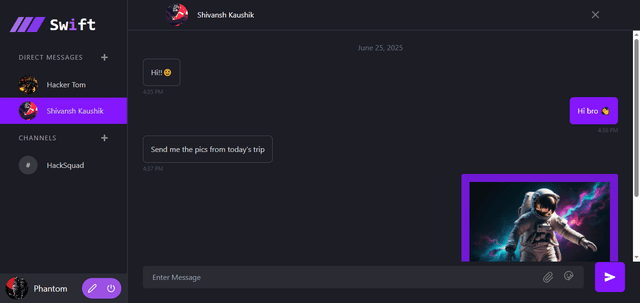
That is how Swift Chat became a full-stack, real-time collaboration project with direct messages, channels, file sharing, threaded replies, reactions, authentication, OAuth, notifications, scheduled messages, and an in-progress one-to-one calling experience.
System Architecture Deep Dive
The idea: chat should feel immediate, not transactional
There is a big difference between an app that stores messages and an app that feels like people are actually present in it. For Swift Chat, the target experience was simple: send direct messages instantly, use channels for group conversations, share files naturally, reply without losing context, and make the product polished enough for a real team.
That meant treating the project as a system, not a collection of separate pages. A new message can affect the database, both screens, a channel feed, a notification, a read state, and possibly a thread.
The frontend: making a busy product feel manageable
The frontend is built with React, TypeScript, Vite, Tailwind CSS, and ShadCN UI. Vite keeps development quick, while Tailwind and ShadCN make it easier to maintain a consistent interface.
Zustand manages fast-moving state such as the selected chat, active thread, reply target, user profile, and live messages. Axios handles API calls, Socket.IO Client handles live events, and Sonner provides feedback.
The main chat UI is built around reusable message bubbles. A message might be text, an image, a video, a file, a reply, a pinned message, an edited message, or a call log, so keeping that behavior reusable makes the product easier to extend.
Threads: keeping the main chat readable
Group chats become difficult to follow when every side conversation happens in the main feed. Threads solve that problem by letting a user open a message in a side panel and continue the discussion there.
The parent message stays visible, replies are loaded from the API, and new thread replies can still arrive through the socket connection in real time. This combines frontend state, MongoDB relationships, REST history loading, and live event handling.
Socket.IO: the part that makes Swift Chat feel alive
The real-time layer is the centre of the project. When a user connects, the server places their socket into a room based on their user ID, allowing direct messages to reach only the sender and intended recipient.
Channels work differently. When a channel message is created, the server retrieves its members and emits the message to each member's room. This gives group conversations their own live update flow.
The socket layer handles direct and channel messages, typing indicators, read events, edits, deletions, reactions, mention notifications, and call signalling. Acknowledgement callbacks also give the client a clear success or failure response after sending.
Files, images, and video attachments
Swift Chat uses Multer for uploads and Cloudinary for media storage. Profile images and message attachments can be uploaded without turning the Express server into a long-term file bucket.
The chat UI recognises common image and video types for previews and inline playback. Other files appear as downloadable attachments, keeping the conversation useful without sending users to another tool.
Authentication without treating security as an afterthought
Authentication is handled with JWTs, password hashing through bcrypt, and Passport strategies for Google and GitHub OAuth.
The backend also includes Helmet, approved-origin CORS, rate limiting, XSS sanitisation, cookie parsing, Zod validation, and centralised error handling. Controllers handle requests, services hold business logic, repositories focus on database access, and middleware handles shared concerns.
Mentions, notifications, and scheduled messages
When a message includes a mention, Swift Chat can create a notification record and emit a new-notification event to that user's personal room. This makes notifications meaningful instead of forcing users to scan every conversation.
Scheduled messages are handled by a cron job that runs every minute, finds messages whose scheduled time has arrived, updates their state, and triggers delivery through the real-time layer. It is a useful example of persistence, background execution, and live delivery working together.
Building a one-to-one voice and video calling flow
Swift Chat includes an early one-to-one audio and video calling implementation using WebRTC. The browser requests media access, creates an RTCPeerConnection, adds local tracks, and listens for the other user's incoming stream.
Socket.IO acts as the signalling channel for offers, answers, ICE candidates, call acceptance, rejection, call ending, and video-state updates. The flow supports mute controls, video toggles, cleanup, and a chat message recording the call attempt.
WebRTC was one of the most educational parts of the project. It requires signalling, browser permissions, peer connection management, ICE candidates, STUN servers, stream cleanup, and recovery when users hang up or deny access.
Scaling mindset: Redis support and clean boundaries
The app can use the Socket.IO Redis adapter when a Redis URL is configured. That gives socket events a path across multiple backend instances instead of limiting the product to one server.
The project also has an architecture document and roadmap covering layered backend design, feature-based frontend structure, validation, testing, Docker, CI/CD, scalability, and future local AI features.
What I learned from building it
Swift Chat taught me that a real-time application is a constant conversation between systems. I learned how to structure a backend beyond routes and controllers, use sockets without broadcasting blindly, model chat data in MongoDB, connect Cloudinary uploads to the UI, and give WebRTC the care it needs.
More importantly, I learned to think about features as user journeys instead of isolated tickets. A message is not done because it was inserted into a database. It is done when it arrives where it should, looks right, handles failure properly, supports the right actions, and does not make the rest of the app harder to maintain.